手不痠嗎
"We've done tons of user testing on this, and it turns out it doesn't work. Touch surfaces don't want to be vertical. It gives great demo, but after a short period of time you start to fatigue, and after an extended period of time, your arm wants to fall off. It doesn't work, it's ergonomically terrible."
(我們做了超多使用者測試,結果發現行不通。觸控表面不想要是垂直的。展示的時候看起來很酷,但用一下子手就開始痠,用久了,手臂簡直要廢掉。真的不行,人體工學上爛透了。)
──Steve Jobs,2010 年,當被問到為什麼不在 MacBook 上做觸控螢幕
"You can converge a toaster and a refrigerator, but those aren't going to be pleasing to the user."
(你當然可以把烤麵包機跟冰箱合在一起,但使用者不會開心的。)
──Tim Cook,2012 年,對於微軟「平板+筆電二合一」產品的評論
"We really feel that the ergonomics of using a Mac are that your hands are rested on a surface, and that lifting your arm up to poke a screen is a pretty fatiguing thing to do."
(我們真的覺得,用 Mac 的正確姿勢就是讓手好好放在平面上。要舉起手臂去戳螢幕,可是有夠累人的。)
──Craig Federighi,2018 年
然後⋯⋯
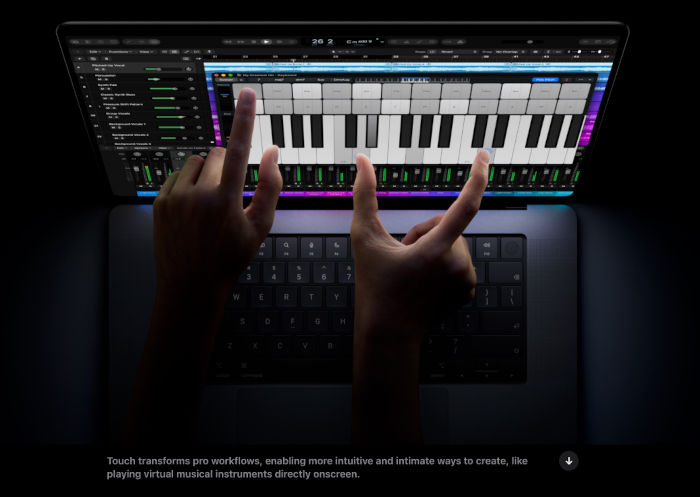
Apple 宣布,即將推出觸控螢幕的 MacBook Pro。
我很好奇他們是怎麼修好「手會痠」這個 bug 的。
("Touch transforms pro workflows."──是的,有了觸控 MacBook 之後,專業音樂人終於可以擺脫沈重的 MIDI 鍵盤,改在一片搖搖晃晃的玻璃上用兩隻手指彈鋼琴了唷!看起來果然是超專業的!)
其實我現在用的的 ThinkPad X280、T480s 和 Microsoft Surface Go 2 筆電也都有觸控螢幕。不過我每年大概只有一兩次會想到:「欸對,它有觸控耶!」然後象徵性地滑兩下之後,繼續回到觸控板和鍵盤。